

Test Tools and Guide Toolkit
This is a test

Key Features of the SmartSaver Account
The SmartSaver Account comes packed with innovative features that set it apart from traditional savings products:
Tiered Interest Rates – The more you save, the higher the interest rate you earn, incentivizing consistent deposits.
Zero Maintaining Balance – Enjoy the freedom of maintaining an account without worrying about balance requirements.
Monthly Interest Payouts – Receive interest earnings on a monthly basis to help you see tangible growth.
Flexible Withdrawals – Access your funds anytime with no penalty for withdrawals, giving you peace of mind.
Why Choose the SmartSaver Account?
We understand that customers have diverse financial goals. Whether you’re saving for a big purchase, an emergency fund, or simply building a nest egg, the SmartSaver Account provides the tools you need for growth. Here’s why it stands out:
High-Interest Rates: With rates up to 2.5% p.a., you can grow your savings faster than a typical savings account.
Digital Banking Convenience: Manage your SmartSaver Account through the Metrobank online platform or mobile app, giving you full control over your savings wherever you are.
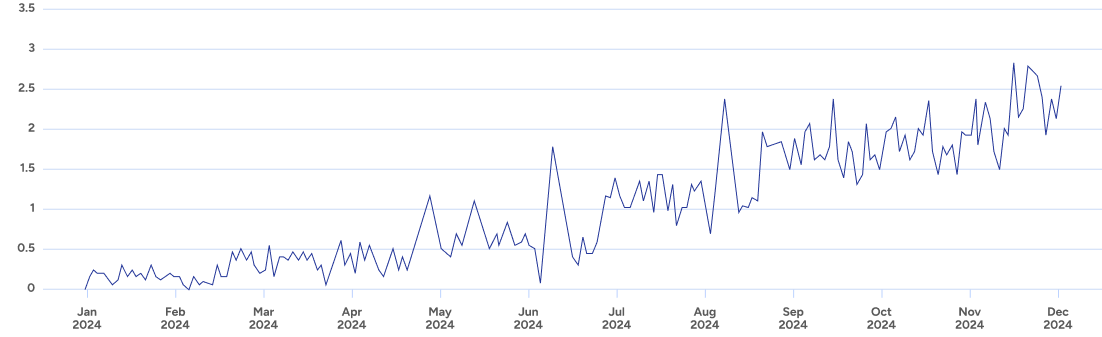
This graph illustrates the growth of savings over a 12-month period with the SmartSaver Account compared to a traditional savings account with a 0.5% interest rate. As shown, the SmartSaver Account offers superior growth potential, providing customers with a more rewarding savings experience.

Start your journey to smarter saving today with the Metrobank SmartSaver Account. Take advantage of this innovative product to achieve your financial goals with ease.
Download the SmartSaver Guide
Want to learn more? We’ve prepared a comprehensive guide to help you understand all the benefits and terms associated with the SmartSaver Account.
Steps to Open Your SmartSaver Account
Opening an account is simple and can be done in just a few steps:
Visit the Metrobank Website – Go to our online banking platform.
Register or Log In – Sign in to your existing account or register as a new user.
Navigate to “Open a New Account” – Select the SmartSaver Account option.
Complete the Form – Fill out the necessary personal and financial information.
Submit and Verify – Submit your application and wait for a confirmation email within 24 hours.
Comparison of SmartSaver Account and Traditional Savings Account
| Feature | SmartSaver Account | Traditional Savings Account |
|---|---|---|
| Interest Rate | Up to 2.5% p.a. | 0.5% p.a. |
| Interest Payout | Monthly | Quarterly or Annually |
| Minimum Balance | No Monthly | PHP 5,000 or more |
| Withdrawals | Flexible, no penalty | Limited, may incur fees |
| Digital Access | Full online and mobile access | Limited or basic access |
Top Tips for Maximizing Your SmartSaver Account
- Set Regular Deposits – Automate monthly contributions to build your savings effortlessly.
- Monitor Your Balance – Higher balances unlock higher interest rates, so keep track of your growth.
- Use Online Tools – Take advantage of Metrobank’s online calculators to forecast your savings.
- Use Online Tools – Take advantage of Metrobank’s online calculators to forecast your savings.
- Use Online Tools – Take advantage of Metrobank’s online calculators to forecast your savings.
- Use Online Tools – Take advantage of Metrobank’s online calculators to forecast your savings.